
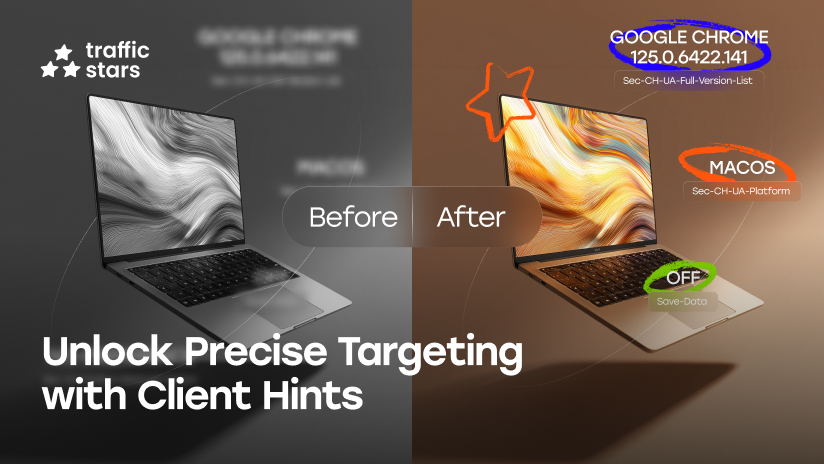
What Are Client Hints
Client Hints are technical hints that a browser can send to a website about the characteristics of a user’s device (model, architecture, bitness, platform version, etc.).
They help the TrafficStars advertising platform (tsyndicate.com) to:
- show the user the most relevant ads (for example, the appropriate video or banner resolution);
- correctly identify the device and operating system;
- collect accurate statistics by device type and improve targeting.
By default, the browser only sends basic data (low-entropy hints). To receive detailed data (high-entropy hints), they must be explicitly requested.
What “Entropy” Means in the Context of Client Hints
Entropy is the degree of “uniqueness” of the information that the browser reveals about the user.
- Low-entropy — safe, general data that cannot be used to identify a user.
- High-entropy — more detailed information about the device and browser, which the browser does not send by default to protect privacy.
To receive high-entropy Client Hints, the site must explicitly request them via Accept-CH.
Low-Entropy Client Hints
These hints are considered “safe by default” — the browser can send them without additional consent. They are sent even without Accept-CH headers and without delegation.
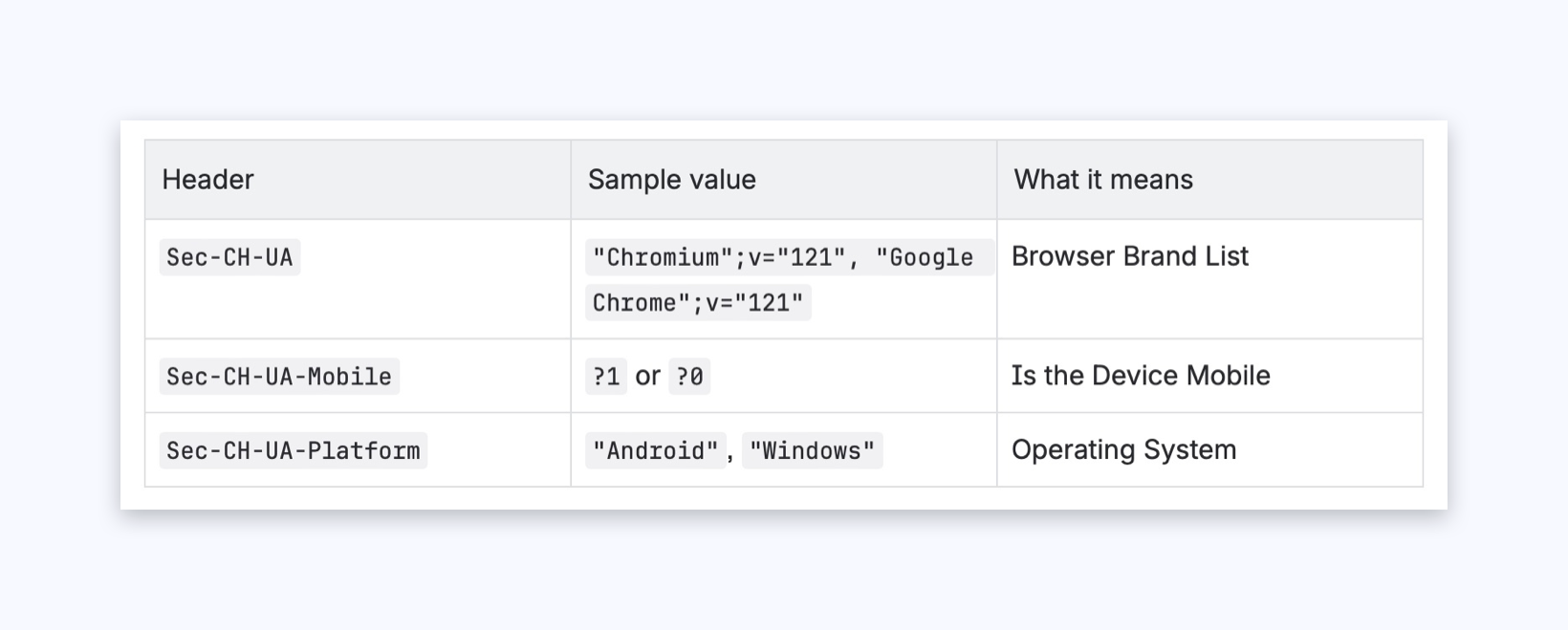
Always Available:
- Even without Accept-CH
- Sent in no-cors requests
- Can be received in an iframe without allow
Security:
- Do not allow identifying a specific user.
High-Entropy Client Hints
These are “detailed” hints — the browser requires permission (opt-in) to send them.
They are sent only if:
- the recipient returned Accept-CH: Sec-CH-UA-Model, …;
- the embedding page allowed delegation (Permissions-Policy);
- the connection is over HTTPS.
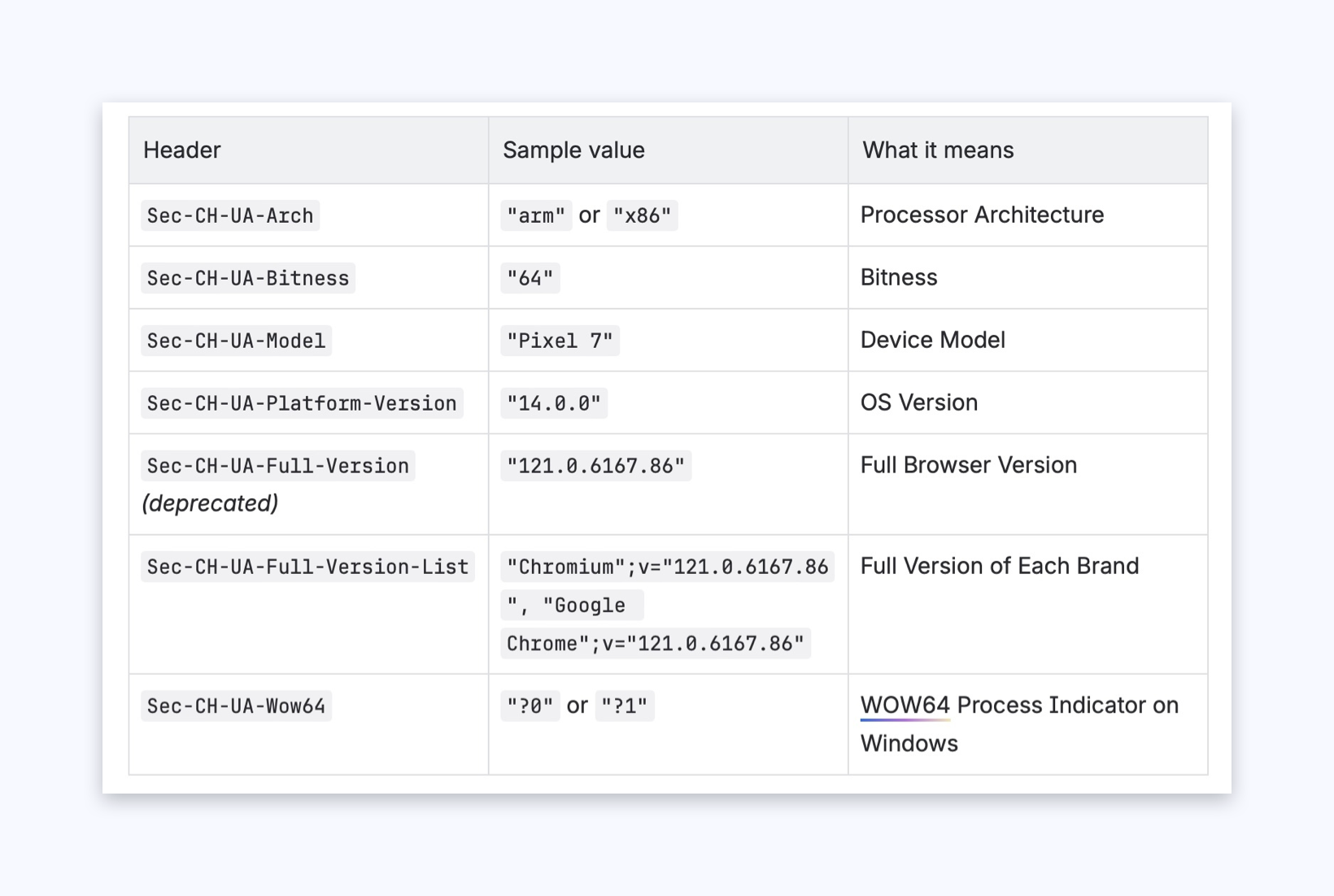
Require:
- Accept-CH (server opt-in);
- Permissions-Policy (delegation in 3rd-party scenarios);
- HTTPS.
Won’t Be Sent Without This:
- in XHR/fetch without CORS,
- in an iframe without delegation,
- over http://,
- in srcdoc without allow-same-origin.
How the Browser Decides What Can Be Sent
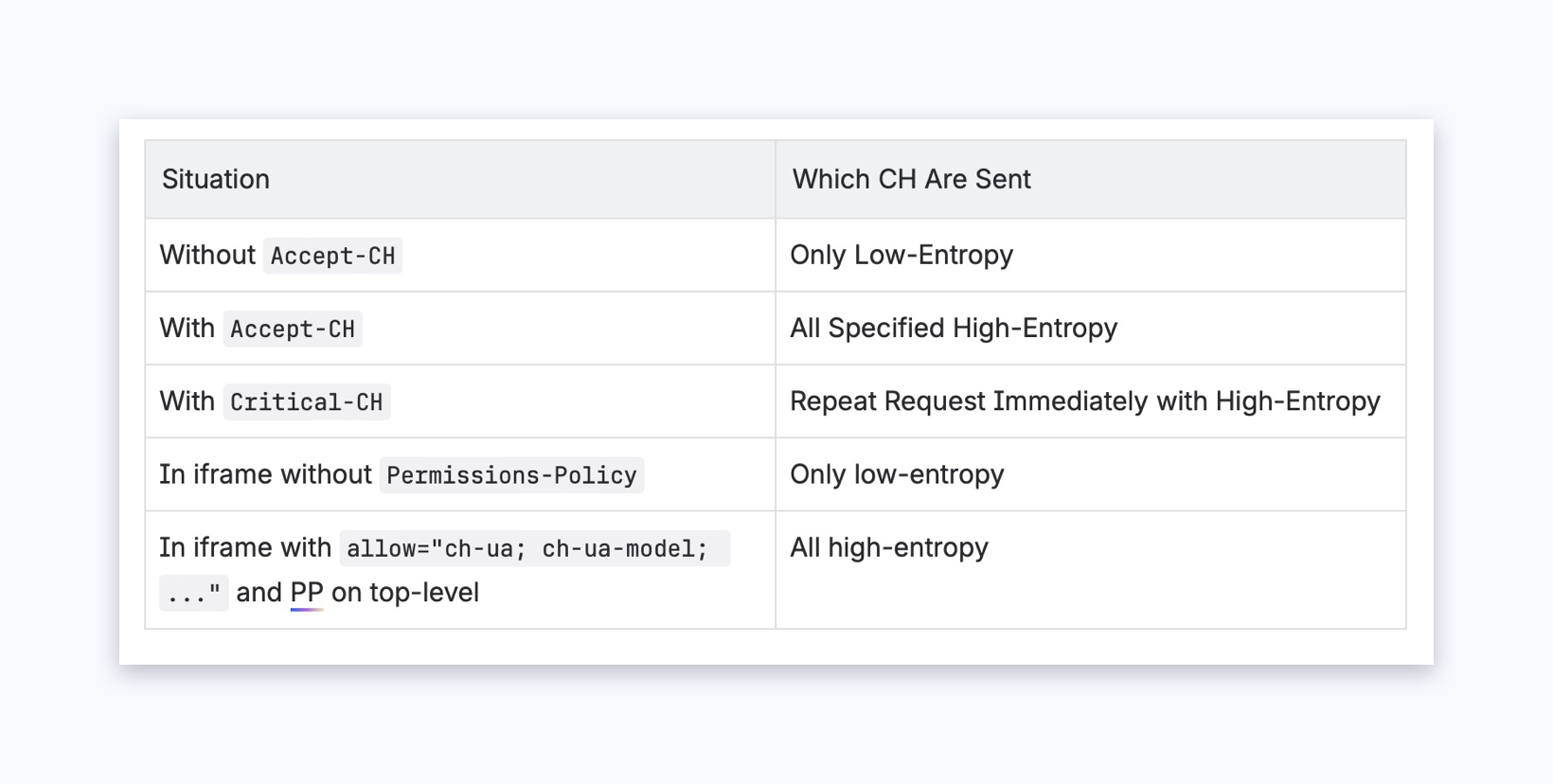
Why This Is Safe
Client Hints do not contain any personal user data — only technical device characteristics:
- CPU and OS model,
- whether the browser is mobile,
- Chrome/Android version, etc.
This data cannot be used to identify a person and is sent only over HTTPS. All modern browsers support this mechanism strictly within the Google Privacy Sandbox privacy policy.
How a Publisher Can Allow Client Hints to Be Sent
1. Minimal Option — Do Nothing
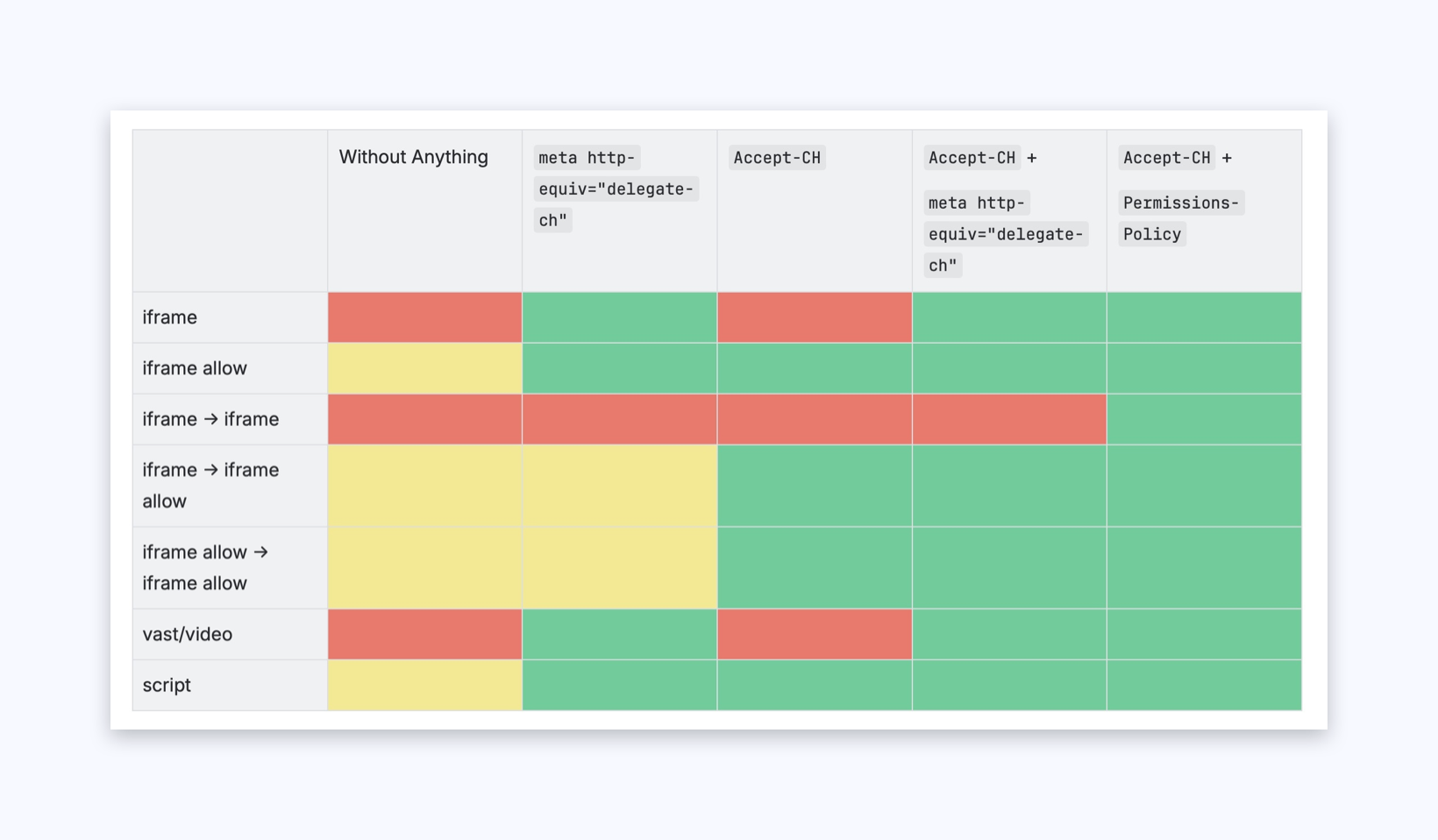
What Happens: The browser only provides basic CH (Sec-CH-UA, Sec-CH-UA-Mobile, Sec-CH-UA-Platform). TrafficStars ads do not receive high-entropy data, and the user’s device is determined approximately.
2. Option with a Meta Tag (Simple but Limited)
If the publisher does not have access to server settings, they can simply add the following in the HTML :
What It Provides:
- Ads and third-party requests (img, video, script) start receiving Client Hints.
- Works even on static websites.
Limitations:
- Hints appear only after the HTML is loaded (the first requests may be sent without them).
- Does not apply to iframe → iframe (nested frames).
- Not all browsers consistently support .
Additionally, for iframes, there is another option — adding allow with a list of Client Hints in the tag. However, this method should be exceptional; the recommended approach is to use masterspot.
3. Option with Accept-CH
If the website’s server allows adding HTTP headers, you need to add:
Accept-CH: Sec-CH-UA, Sec-CH-UA-Bitness, Sec-CH-UA-Arch, Sec-CH-UA-Model, Sec-CH-UA-Platform, Sec-CH-UA-Platform-Version, Sec-CH-UA-Full-Version-List, Sec-CH-UA-Mobile, Sec-CH-UA-Wow64
What It Provides:
- The browser starts collecting high-entropy Client Hints.
- When paired with iframe allow, CH are sent even into nested iframes.
Limitations:
- Without Permissions-Policy, high-entropy CH are not sent to third-party domains (for example, tsyndicate.com).
- Does not work for images, videos, and other non-iframe requests.
4. Option with Accept-CH +
A combination for better compatibility. Works well even in browsers where the meta tag activates delegation faster than the header.
What it gives you:
- Guaranteed delivery of Client Hints in iframe, img, video, and script.
- Simple to implement if the server is limited.
Recommended for sites with minimal configuration control.
5. Optimal option — Accept-CH + Permissions-Policy
This is the recommended production setup. If your site’s server allows adding HTTP headers, you need to add:
Accept-CH: Sec-CH-UA, Sec-CH-UA-Bitness, Sec-CH-UA-Arch, Sec-CH-UA-Model, Sec-CH-UA-Platform, Sec-CH-UA-Platform-Version, Sec-CH-UA-Full-Version-List, Sec-CH-UA-Mobile, Sec-CH-UA-Wow64 Permissions-Policy: ch-ua=(self "https://tsyndicate.com"), ch-ua-bitness=(self "https://tsyndicate.com"), ch-ua-arch=(self "https://tsyndicate.com"), ch-ua-model=(self "https://tsyndicate.com"), ch-ua-platform=(self "https://tsyndicate.com"), ch-ua-platform-version=(self "https://tsyndicate.com"), ch-ua-full-version-list=(self "https://tsyndicate.com"), ch-ua-mobile=(self "https://tsyndicate.com"), ch-ua-wow64=(self "https://tsyndicate.com")
What it gives you:
- Works for all formats: iframe, iframe → iframe, img, video, script.
- Delegates Client Hints safely and according to the specification.
- Guarantees the delivery of high-entropy Client Hints on the very first request.
- Fully compatible with CDNs and caches.
Why This Matters for Publishers
- More relevant ads → higher CTR and revenue.
- Faster page loading → ad assets are optimized for the user’s device.
- More accurate analytics → correct detection of device model and OS.
- Safe and private → CH contain only technical data, no personal information.
How to Enable Client Hints on Your Site
The main recommendation for all sites is to switch to the TrafficStars MasterSpot script. It already includes all necessary settings and is the easiest and most reliable way to ensure ads work correctly and perform at their best.
Before choosing an integration option, check your technical capabilities:
- Do you have access to server settings?
- Can you add HTTP headers?
- Or can you only edit HTML code?
Luxury Maximum
What to Do:
- Configure Accept-CH HTTP headers and Permissions-Policy delegation on your server.
Benefits:
- Full support for all ad formats (iframe, img, video, script).
- Sends the most detailed device information for precise targeting.
- Guaranteed operation even in complex scenarios (nested iframes, CDN, caches).
Standard
What to Do:
- Add Accept-CH HTTP headers and in HTML.
Benefits:
- Sends detailed device data for all formats except nested frames.
- Easy to implement if server access is limited.
Minimum
What to Do:
- Add only in HTML.
Benefits:
- Ads receive device data after the HTML loads.
- Works even on static websites.
Basic Minimum
What to Do:
- Add Accept-CH HTTP header.
Benefits:
- Browser allows hints to be collected on the publisher’s page via script.
Option Effectiveness



.png)
.png)
.png)