
Black Friday and Cyber Monday are when advertisers launch their biggest promotions and push their budgets up. Everyone bids for the same traffic at the same time, and the auction gets more expensive. Last year on TrafficStars, average CPM on non-prime inventory rose 16% on Black Friday, and prime CPM was up 10% by Cyber Monday.
Even in that week, prime inventory frees up, and we can see where. From Black Friday, 27 November, through Cyber Monday and the rest of the week, our Special Offers in Marketplace are prime spots on sites that perform and convert, with a high share of organic traffic, priced below the average.
Below: why these spots pay off, how they give your whitelist a head start, and a five-minute walkthrough to buy them.
Find prime spots below the average price in Marketplace
What Marketplace is
Marketplace answers the question media buyers ask us most: "Do you have traffic for my offer in my geos?" Instead of an email thread with your account manager, you see the answer on screen, with numbers, and you can buy in a few clicks.
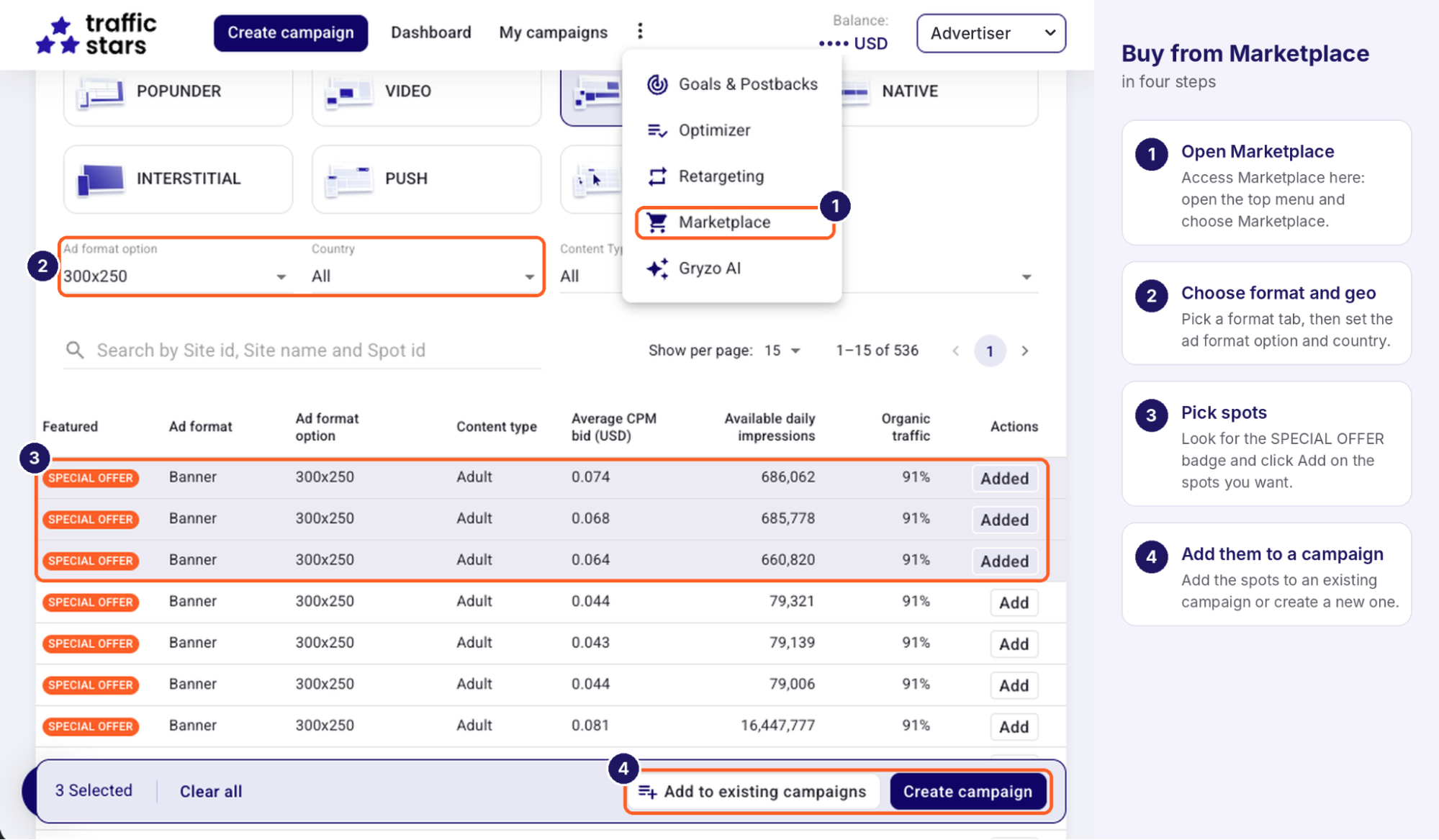
- Every format in one place: Popunder, Video, Banner, Native, Interstitial and Push, with Tabs on request.
- Filters that match how you buy: ad format option, country, content type and spot, plus search by site ID, site name or spot ID.
- Numbers for your exact selection: the recommended bid and available daily impressions (a 30-day average) are recalculated for the countries, categories and devices you choose.
- Audience quality you can see: an Organic traffic column for every spot.
- A few clicks to buy: click Add on the spots you want, then add them to an existing campaign or create a new one with those spots already filled in.
Marketplace is open to every TrafficStars advertiser, all year. Special Offers are how we point you to the right part of it during the most expensive week of the year.
Explore Marketplace and see every spot with its organic share and recommended bid.
Use case: US and Canada mobile banners in Black Friday week
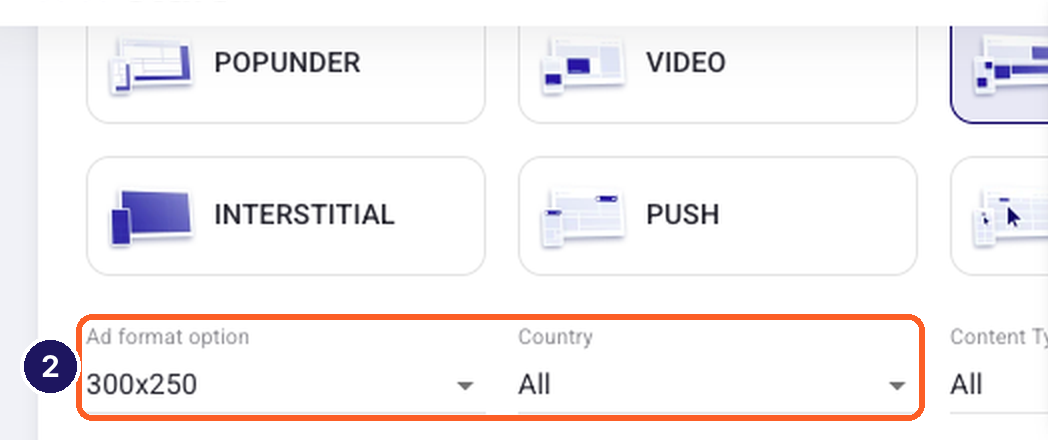
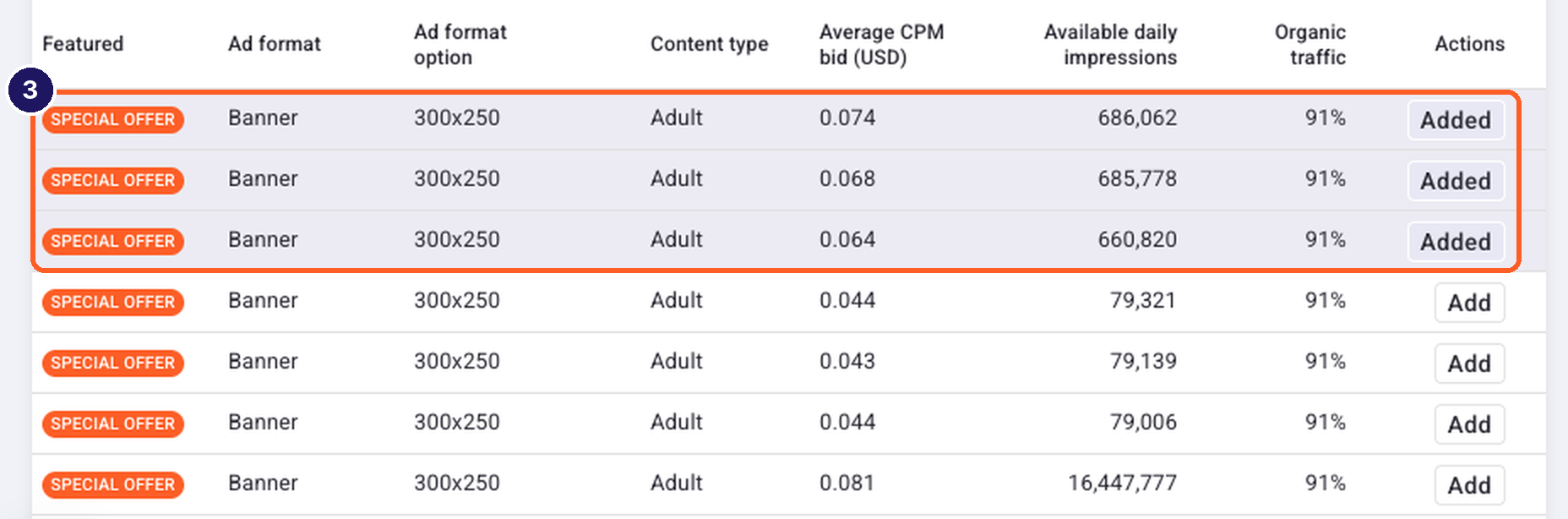
An affiliate running an adult dating offer wants mobile banner traffic in the US and Canada for Black Friday week. Their usual spots are getting more expensive by the day. In Marketplace they choose Banner, set the ad format option to 300x250, Country to US and CA and Content type to Adult. Sorting by organic traffic and looking for the SPECIAL OFFER badge in the Featured column gives them a shortlist of prime spots on sites that perform, with around 91% organic traffic and prices below the average.
They click Add on four Special Offer spots, then Create campaign. The new campaign opens with the spots filled in, and it is live within minutes. Because the budget is spread across four spots instead of dozens, each one has enough data to judge within the first days. The winners go on the whitelist and stay in the campaign after the offer week ends, and the test budget they didn't need is still in the account.
Organic traffic performs and converts best
The Organic traffic column in Marketplace shows the share of a site's visitors who come on their own: from search, direct visits and bookmarks. These visitors chose to be there, and many come back again and again. That makes them more engaged with the page, more likely to act on the ads they see, and more likely to convert once they reach your landing page.
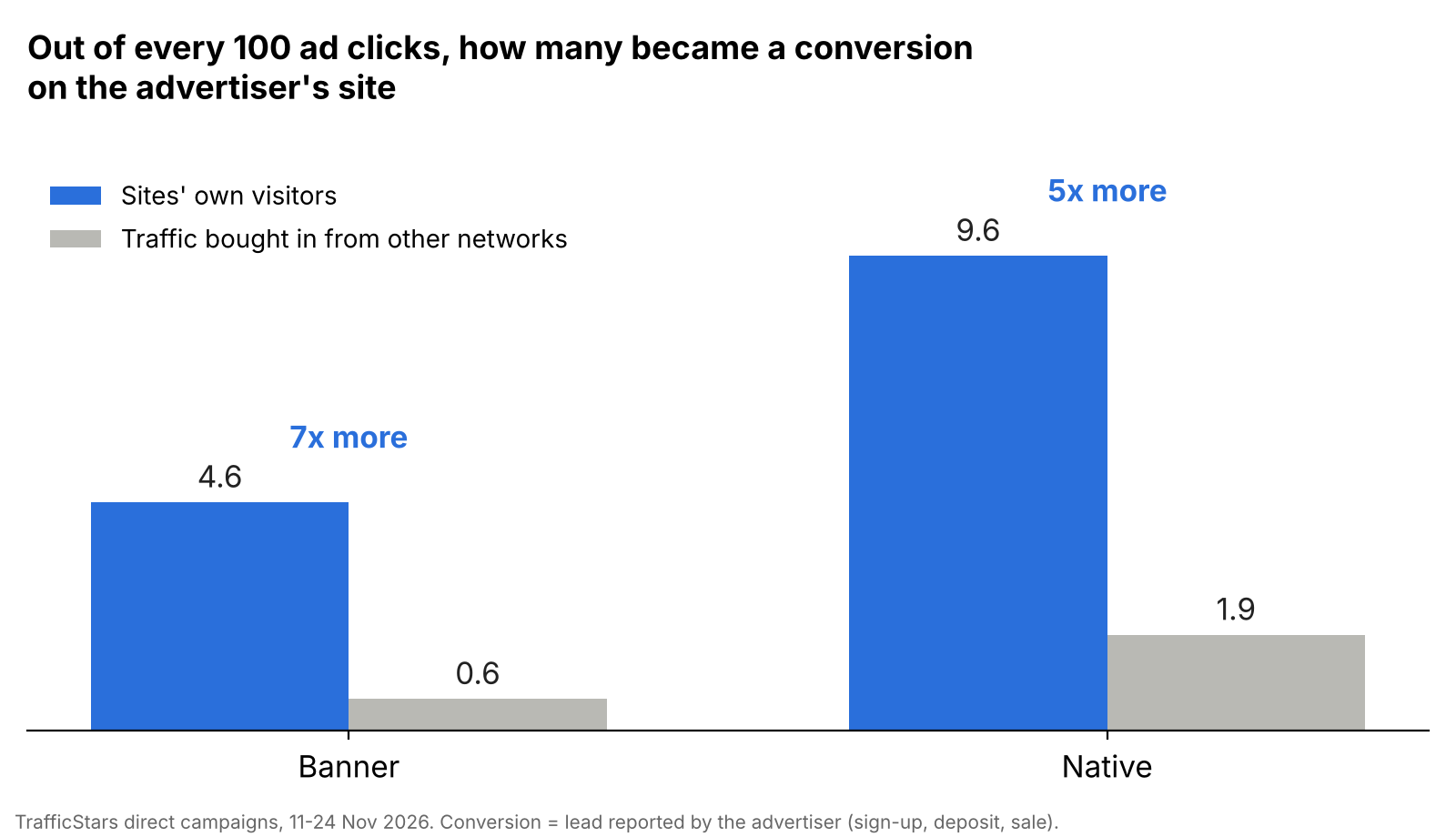
On banners, 4.6 of every 100 clicks from a site's own visitors became a conversion, against 0.6 from bought-in traffic: about 7 times more. On native it was 9.6 against 1.9, about 5 times more. Visitors who come to a site on their own don't just see your ad: they act on it, and they finish the action on your side.
Special Offers are the spots with the highest organic share. The Special Offer spots in the screenshot above run at 91% organic traffic.
Sort Marketplace by organic traffic and start from the spots with the most engaged audiences.
A head start to your whitelist
Every campaign starts the same way: you buy a broad list, collect data and move the spots that work to a whitelist. Every day spent testing is a day at negative ROI, paid for out of your test budget.
Marketplace gives you a head start. You start from selected prime spots at low prices instead of a broad list, which saves you both time and test budget:
- A shortlist instead of hundreds of spots. Your budget is concentrated, so each spot collects enough data to judge in days, not weeks.
- A lower price per test day. Testing on below-average prices makes every day of it cheaper.
- Winners you keep. Once you find the spots that work for you, they stay in your campaign for as long as they keep working, and the test budget you saved stays saved.
To show what a shorter test is worth, we modelled two 30-day campaigns with the same daily budget and the same whitelist quality: ROI of -40% while testing and +30% after whitelisting. The only difference is how long testing takes, 12 days on a broad list against 5 days starting from Special Offers.
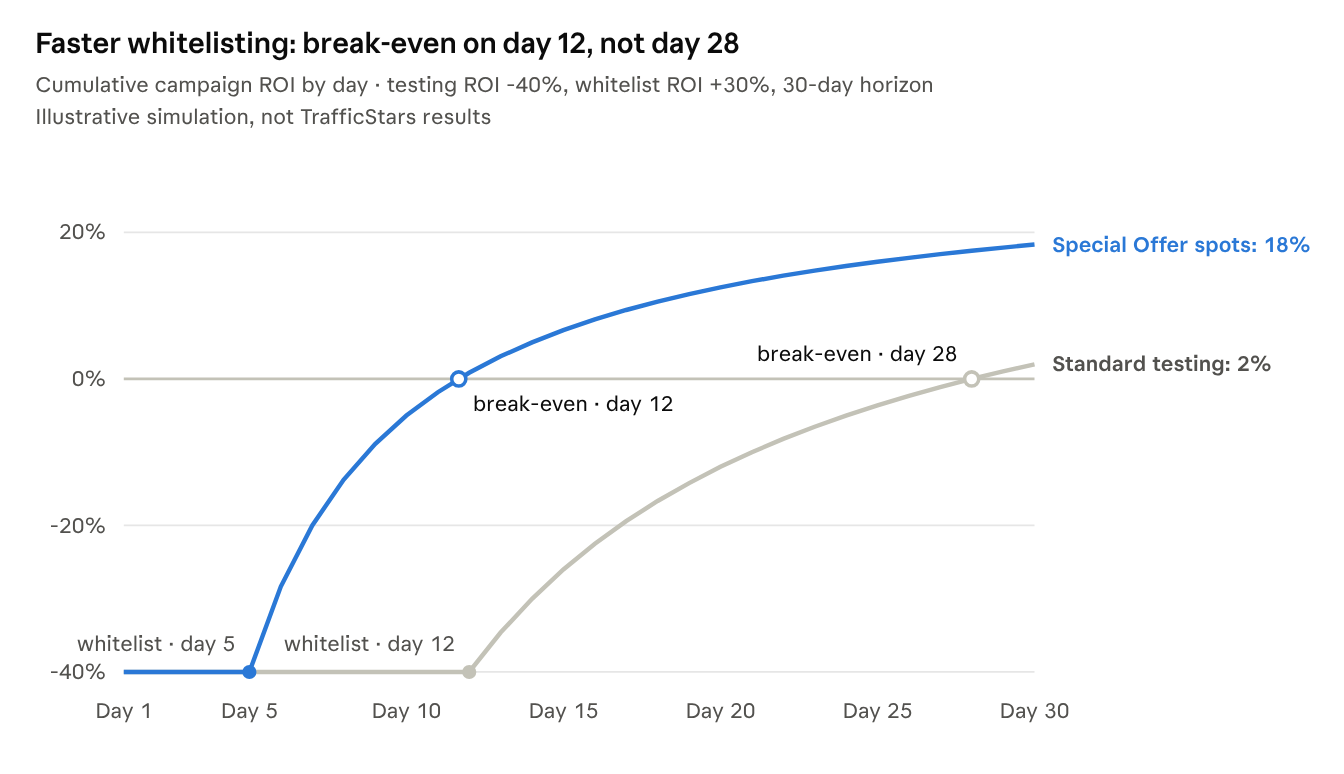
Starting from Special Offers moves break-even from day 28 to day 12 and lifts 30-day ROI from 2% to 18%, about nine times. The lower entry price would improve this further; the model leaves it out to stay conservative. These are illustrative assumptions, not results from a specific campaign.
Walkthrough: from Marketplace to a live campaign in five minutes
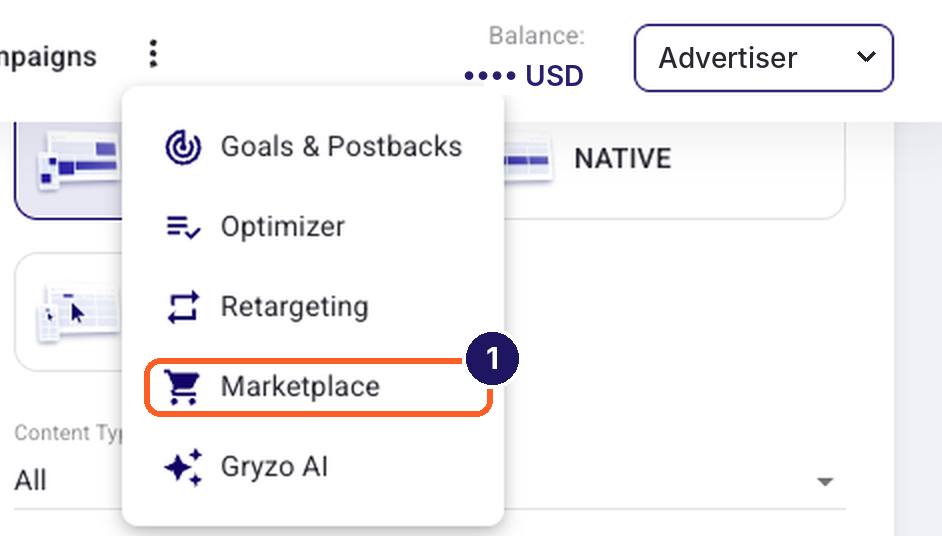
1. Open Marketplace. In your TrafficStars dashboard, open the menu at the top and choose Marketplace. Complete your profile first so your campaign can be approved.
2. Choose format and GEO. Click a format tab, then set the ad format option, country and content type. Bids and daily impressions recalculate for your selection.
3. Pick spots. Sort by organic traffic or available daily impressions and look for the SPECIAL OFFER badge in the Featured column. Special Offers are prime spots. Click Add on each spot you want; you can add one or several.
4. Add them to a campaign. Once you've added spots, a bar appears at the bottom of the page. Choose Add to existing campaigns to put them into a campaign you already run, or Create campaign to start a new one with the spots already filled in.

5. Launch. For a new campaign, add your creative, bid at the recommended bid, and launch.
Tips for Black Friday week
- Start at the recommended bid. It is already calculated for your geo, category and device.
- Run Special Offer spots as their own campaign, so their results are easy to read.
- Whitelist the winners as soon as you have enough data, and keep them after the offer week.
FAQ
What is a Special Offer spot?
A prime spot on a site that performs and converts, with a high share of organic traffic, priced below the average.
How long do Special Offers last?
From Black Friday, 27 November, through the following week.
Do I keep the spots after that?
Yes. The spots stay in your campaign for as long as they work for you.
Can I use Marketplace after Black Friday?
Yes. Marketplace is open to all TrafficStars advertisers all year, with every spot and every format.
What does "Organic traffic" mean in Marketplace?
The share of a site's visitors who arrive on their own, through search, direct visits or bookmarks.
Get prime traffic below the average price this Black Frida and Cyber Monday
Black Friday and Cyber Monday raise the auction. Special Offers keep prime traffic within reach until the end of next week. After that, Marketplace stays: every spot, every format, a few clicks to buy.




.png)
.png)