
We are excited to introduce Gryzo AI - a built-in intelligent assistant developed specifically for TrafficStars advertisers. This is not just a chatbot for Q&A, but a fully-fledged automation tool that can analyze statistics, set up campaigns, and manage optimization on your behalf.
You can use Gryzo AI in two modes: Chat and Agent. Below is everything an advertiser needs to know to get the most out of this new feature in just 3 minutes of reading.
⚡ Chat vs. Agent Mode
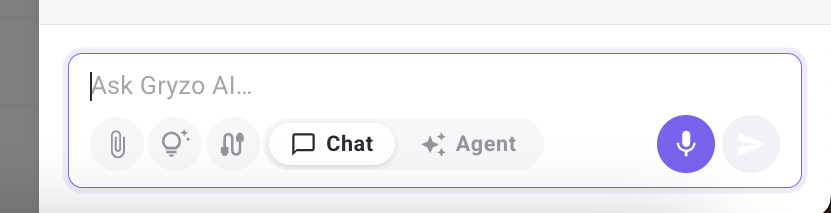
The toggle to switch between Chat/Agent modes is located right next to the message input field.
- Chat Mode (Default). Best for: Analysis, auditing, and planning.In this mode, Gryzo AI acts as a smart advisor. It has "read-only" access to your account and cannot change anything without your direct action. What it does: Generates links to ready-made UI reports (by ROI, ad spots, creatives, GEOs), checks balances, troubleshoots drops in traffic or conversions, and suggests targeting setups.
- Agent Mode. Best for: Full end-to-end automation and campaign management.In this mode, the AI can independently execute commands on your account via API, but strictly after your explicit text confirmation. No action will ever be applied without your "Yes". What it does: Creates draft campaigns, edits bids, manages budgets, manages whitelists/blacklists, uploads creatives, and configures automated optimization rules.
🛠 What exactly can Gryzo AI do in Agent Mode?
🎯 End-to-End campaign creation
You no longer need to click through multiple tabs to set up a campaign. You can simply type a text brief:
“Create a popunder CPA campaign for offer [link], US and CA, iOS, $50 daily budget.”
How it works:
- Gryzo AI pulls recommended bid tiers for your target countries and OS.
- It proposes a final setup plan (name, format, targeting, bids).
- Once you confirm, it creates a real draft campaign (Draft) in your account and provides a clickable link.
- You can then ask it to add creatives or adjust schedules, and finally command: “Publish it.”
📉 Smart optimization and spot filtering
Instead of manually digging through spreadsheets, Gryzo AI builds precise data cuts for you.
Analysis: It generates and opens a UI report link for specific parameters (e.g., grouped by ad spots over the last 7 days).
Action: You review the report data and tell the assistant: “Blacklist spots with more than $5 spent and 0 conversions.” Gryzo AI immediately stages the API command, shows you the exact list of targets, and applies the blacklist to your campaign after you say yes.
Bid Management: You can instruct it to bulk-raise bids on converting spots or cut prices on underperforming ones.
🤖 Auto-Rule setup (Optimizer)
You can delegate the configuration of the built-in TrafficStars Optimizer to Gryzo AI to clean up campaigns automatically based on mathematical rules.
You define your goal (e.g., “Protect my budget: pause zones if eCPA exceeds $10”).
Gryzo AI resolves the correct system metric IDs, structures the strategy, builds the rule groups, and links them to your live campaign.
🚫 Limitations: What Gryzo AI CANNOT do
While the AI is powerful, it does not completely replace manual control and cannot bypass form-only restrictions.
The following settings cannot be configured via tools (manual form only):
- Smart CPM and DCPM.
- Campaign-level Target CPA.
- Lifetime budget.
- Per-GEO bids within a single campaign.
The AI will never invent non-existent IDs and will never launch traffic behind your back.
🚀 How to get started right now
Steps:
- Open the Gryzo AI window in your advertiser dashboard.
- If you want to assess your current performance first, stay in Chat mode and ask: “Review my active campaigns for the last 7 days and pinpoint where I am losing money.”
- Once you are ready to delegate the routine tasks, toggle the switch to Agent mode and give a direct command to optimize or create a campaign.
ℹ️ Disclaimer: This tool is developed solely for the automation and optimization of advertising campaigns. Gryzo AI does not provide financial performance guarantees, and the final decision to launch, modify budgets, or change bids always rests with the advertiser. Please test all new ad setups carefully.
Ready to see Gryzo AI in action?
Gryzo AI Reports
A report is an analysis of your account performed automatically by Gryzo—either on a schedule (daily, weekly) or on demand via the "Run now" button.
You only need to define the task once. After that, Gryzo regularly gathers data from TrafficStars and delivers a ready-made dashboard containing:
- key figures
- tables and charts
- brief insights on what has changed.
All runs are saved in your history. A chat feature next to the report allows you to clarify figures or request changes to the report itself. How to create: click the + button at the top of the panel → New scheduled report.
Gryzo includes specific actionable steps with every report—things to do based on the analysis.
Actionable recommendations. For example: raising a bid, stopping a losing campaign, or cloning a successful one for a new GEO.
Each recommendation explains the rationale (citing figures from the report) and shows exactly what will change. Gryzo does not make changes automatically; updates are applied only when you click Apply. If you disagree, select Dismiss.
Advisory tips. Steps that require human intervention—such as checking postbacks, updating creatives, or discussing terms with a manager. These cards feature a single button ("Got it") and do not alter your account settings.
Why use this? No need to dig through statistics every day. You instantly see what has changed, where the problem lies, and what steps to take.
🎯 Tip: Be specific: specify the time period, metrics, breakdown (campaign, country, spot), and what needs to be calculated. It is better to have several focused reports rather than one massive report covering everything at once (e.g., "every day × all campaigns × all countries × all metrics"). An overly broad request makes the report heavy and slow to generate.
support@trafficstars.com