
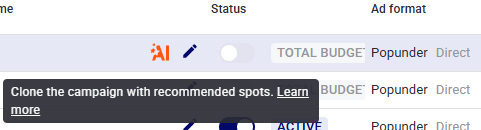
We've added a smart AI button to the My Campaigns section. Now, for any of your active campaigns (with at least 15 days of history), AI can instantly pick the top spots for a new funnel. You no longer need to manually dig through stats, compare hundreds of sites, or guess where your creatives will work best.
How it works in 3 steps:
- Select a donor campaign (one that's already delivering good results).
- Click the AI button.
- The system creates a clone of the campaign with an automatically filled spot whitelist. All that's left is to launch and get leads.
Why is this beneficial?
- You don't waste budget on tests. The algorithm analyzes statistics from the last 15–30 days and suggests only those spots where there's already a high probability. No more trial and error. For Spot AI to see CR (Conversion Rate) and predict the best spots, the donor campaign must have a tracker (postback) configured.
- Improved CPA. Our tests show that campaigns created with Spot AI often outperform the original in cost per action.
- Higher campaign retention. Thanks to a relevant whitelist, campaigns last longer and spend more steadily. We track retention — and AI‑driven campaigns perform noticeably better here.
- Full control.
You don't lose flexibility:
- You can override any parameters in the new campaign (budget, creatives, offers).
- Spots are added directly to the whitelist.
- Blacklists and other settings remain empty or are copied as you prefer.
Summary:
Spot AI is more than just a spot generator. It's a tool that turns your past statistics into future revenue. Less manual work, more predictable results.
👉 Go to My Campaigns and find the AI button for any campaign with at least 15 days of history.
Questions? We've prepared a detailed FAQ if the AI can't generate a recommendation.
Was this article helpful? Your feedback matters to us!
If you need assistance, please contact us 24/7 via live chat or email at
support@trafficstars.com
support@trafficstars.com