
CPA (Cost Per Action) is a pricing model where you pay for specific user actions — registrations, form submissions, deposits or purchases — instead of impressions or clicks. Below you’ll find how to launch a CPA campaign on TrafficStars, how the test period works and how to keep your campaign getting traffic.
Before you start
⚠️ A CPA campaign can’t work without conversion tracking. Set up an S2S postback before launching the campaign.
💡 Choose a simple conversion that happens often — several times a day or at least a few times a week: a registration, a form submission or an email confirmation. The more conversions the campaign gets, the better it performs in the auction.
How to create a CPA campaign
- Click Create campaign, enter the campaign name and choose the ad format.
- Set up targeting. Create separate campaigns for different GEOs and groups of ad spots — this way each campaign gets enough traffic to be evaluated.
- Go to Audience and pricing, select CPA and enter the price you pay per conversion.
- Set the test period budget: minimum $50; for Tier-1 and Tier-2 GEOs we recommend $100 or more.
- Add your landing page URL and tokens, then click Publish. Once the campaign is approved, it goes into rotation and the test period starts.
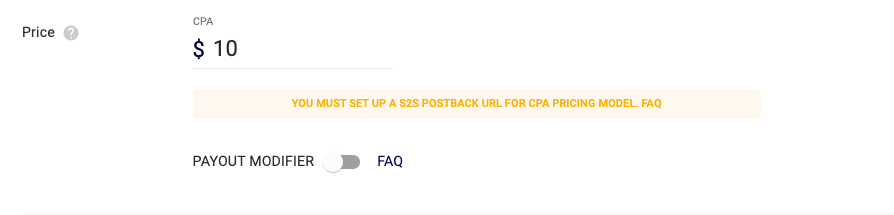
💡 The CPA price is charged for each conversion unless a different amount is passed in the postback. If you pass the full payout from your CPA network, use the Payout modifier to keep your ROI accurate.
How the test period works
During the test period, the campaign gets traffic at the recommended bid for each GEO + spot combination. This is how the system collects data to calculate the campaign’s effectiveness in every zone.
- You pay for impressions and for conversions, so the cost per lead is temporarily higher.
- The test ends when the test budget is spent.
- After the test, you pay only for conversions.
What budget do I need?
The minimum test budget is $50. The wider your targeting, the bigger the budget should be. Tier-1 and Tier-2 GEOs are highly competitive, so we recommend setting $100 or more.
What restarts the test period?
The test period starts over if you:
- create a new campaign or clone an existing one (including Save as) — the copy always gets its own test period, which starts again the first time you run it;
- switch the pricing model from CPM to CPA or CPC (switching between CPA and CPC doesn’t restart the test; switching to CPM turns the test off);
- click Run when the campaign has had no impressions in the last 24 hours — no matter how long it was paused and how it stopped: manually or by the system (for example, when the funds or the campaign end date ran out), and even if it stayed Active;
- increase the Total budget after it has been spent, if the campaign has had no impressions in the last 24 hours;
- make changes that send the campaign back to moderation — the test restarts as soon as the campaign is approved again, even if it’s paused.
💡 The same rules apply to bulk actions (pause/run) and to changes made via the API.
What sends a campaign back to moderation?
- adding a country to the targeting list or replacing a country with another one;
- removing the country restriction (switching to all countries);
- running a campaign after a pause if it’s older than 30 days and has had no impressions in the last 30 days — in this case the test restarts twice: when you run the campaign and when it’s approved.
Removing a country from the list, or limiting a campaign that targeted all countries, doesn’t send it to moderation.
What doesn’t restart the test period?
- targeting changes other than countries: language, OS, devices, browsers, categories, zones, sites and spots, IP/ISP;
- campaign name, schedule, bid, daily budget and frequency cap;
- any creative changes: new creatives, titles, texts, images, videos, URLs or domains — creatives go through moderation, but this doesn’t affect the campaign’s test period;
- pausing the campaign by itself — only the next Run matters.
⚠️ If your campaign hasn’t received traffic for a while, contact your manager or Support before stopping and restarting it.
After the test period
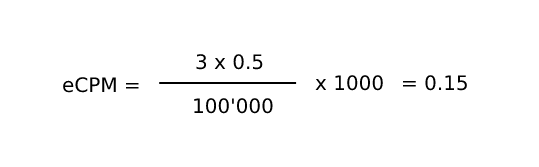
After the test, the campaign bids by eCPM. eCPM is calculated separately for each GEO + spot combination based on eCPA and the number of conversions over the last 7 days.
Example: the combination spot ID_1 + Indonesia received 100,000 impressions and 3 conversions with eCPA = $0.50. After the test, the campaign bids in this zone with the following eCPM:
How eCPM affects your traffic:
- The lower the eCPM, the less traffic the campaign gets.
- If the 7-day eCPM in a zone (GEO + spot) falls below the minimum bid, traffic from that zone stops.
- If a zone gets fewer than 30 impressions over 7 days, the campaign stops receiving traffic there.
Tips and troubleshooting
I got 0 conversions. What should I do?
First, check that your postback is set up correctly. If it is, try new creatives or a different landing page, or change the offer and targeting. To start a new test, create a new CPA campaign.
How do I get the most out of the test?
- Don’t test many spots and countries in one campaign — each zone won’t get enough traffic during the test.
- Split GEOs and groups of spots into separate campaigns.
- Avoid pausing the campaign or adding new countries during the test, so you don’t restart it.
Ready to launch? Create your first CPA campaign and start paying only for results.
support@trafficstars.com