
Gryzo AI – An Assistant for Advertisers and Publishers
Gryzo AI is the LLM-based assistant built directly into your TrafficStars account that makes each of your managers X10 times effective, precise and fast while working with the TrafficStars platform.
Gryzo AI for Advertisers means creating and editing campaigns, analyzing the performance of your current campaigns, setting targeting and bids, configuring the Optimizer and postbacks, and applying changes across many campaigns at once. For publishers, it means adding and setting up websites, configuring ad spots and formats, reading performance, and finding your way around the platform without digging through menus.
One rule keeps you in charge: Gryzo previews every change and applies it only after your explicit confirmation. Nothing goes live on your account without your "yes."
Gryzo AI is NEVER trained on your personal data. It analyzes the performance of your campaigns exclusively within the walled garden of your TrafficStars account. Your data remains highly secure, is never used to train Gryzo AI, and is used solely to analyze and optimize your own campaigns to serve your business goals.
Gryzo AI works in two modes:
- Chat mode — read-only. It inspects, explains, analyses and plans, but changes nothing.
- Agent mode — everything Chat does, plus real changes to your account, each one previewed and confirmed first. You switch with the Chat/Agent toggle next to the input field.
There's also a third way in: connect your ChatGPT or Claude through the MCP connector and work with your TrafficStars account directly from your preferred LLM chat. Read the instructions →
Gryzo lives inside your account. Chat mode plans; Agent mode acts.
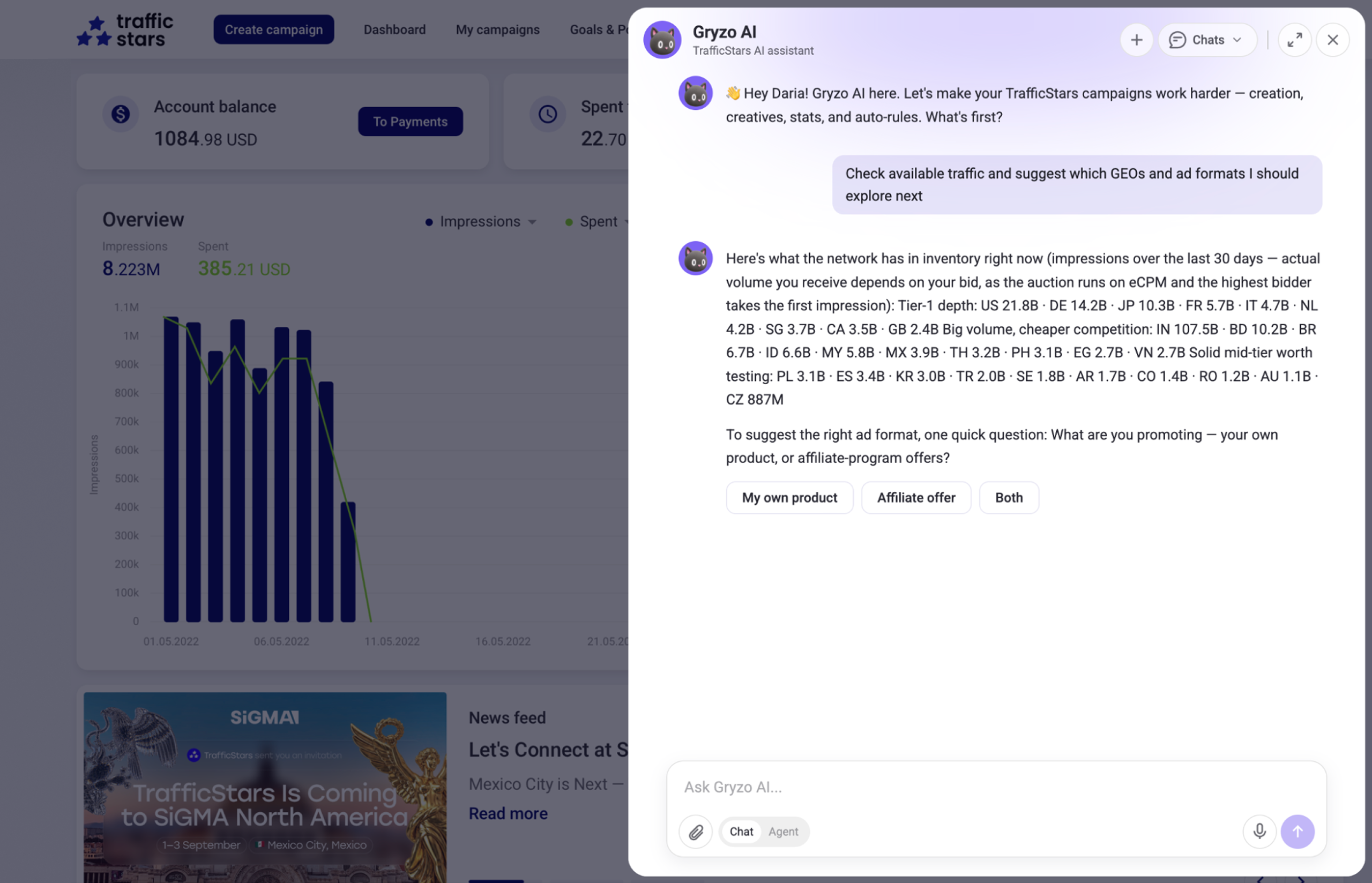
For Advertisers: Create, Analyze, Optimise
End-to-End campaign creation
When you know exactly what you want, there is no reason to spend over a minute on campaign creation. Just prompt Gryzo AI with your offer, goal and main target.
“Create a popunder CPA campaign for offer [link], US and CA, iOS, $50 daily budget.”
How it works:
- Gryzo AI pulls recommended bid tiers for your target countries and OS.
- It proposes a final setup plan (name, format, targeting, bids).
- Once you confirm, it creates a real draft campaign (Draft) in your account and provides a clickable link.
- You can then ask it to add creatives or adjust schedules, and finally command: “Publish it.”
Smart Analysis, Optimization and Spot Filtering
Media buying success has always been data-driven. With Gryzo AI, you get all your data, analysis and insights in no time and without digging through multiple reports. Just ask for it!
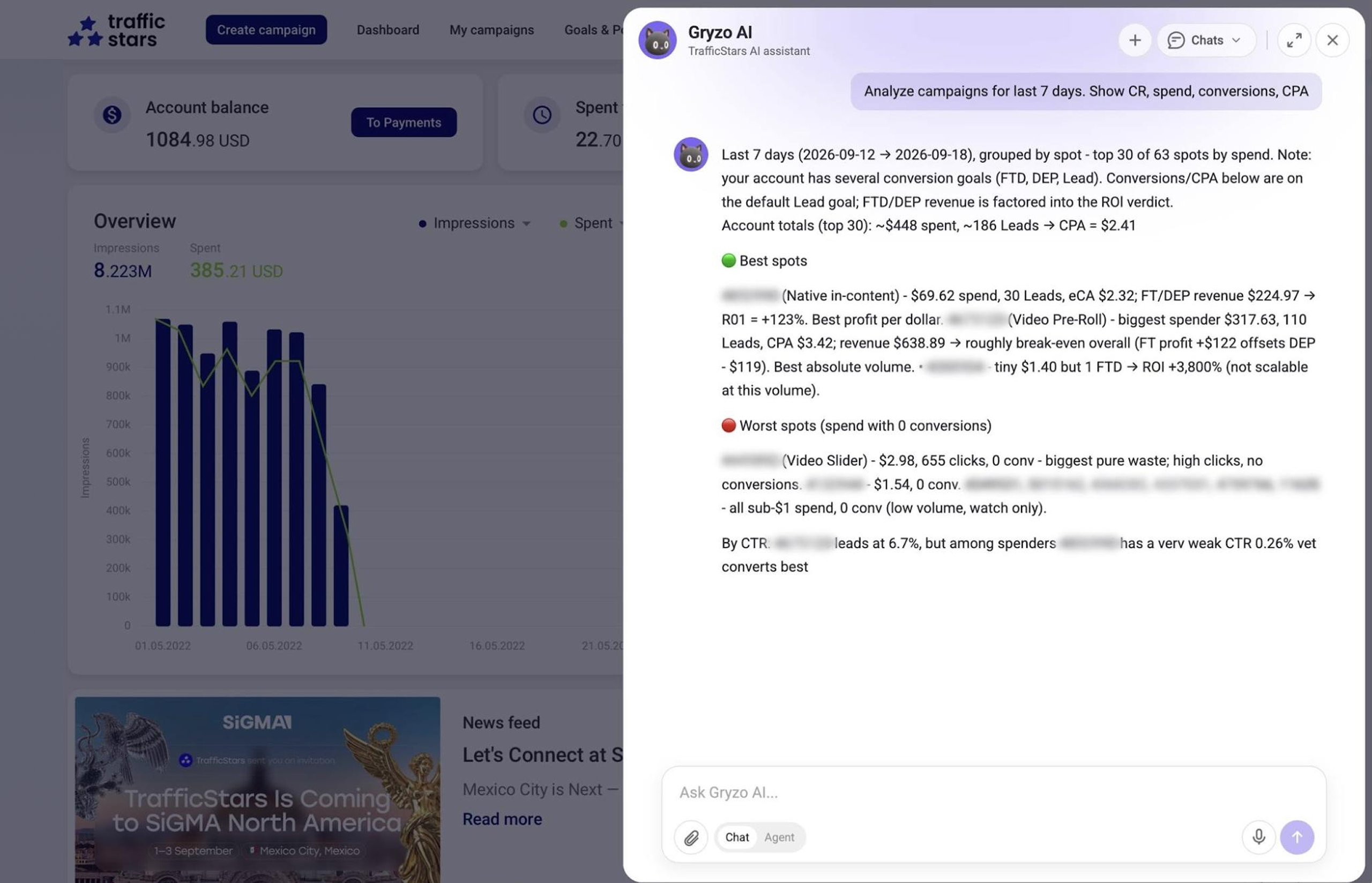
Analysis: It generates and opens a UI report link for specific parameters (e.g., grouped by ad spots over the last 7 days).
Action: You review the report data and tell the assistant: “Blacklist spots with more than $5 spent and 0 conversions.” Gryzo AI immediately stages the API command, shows you the exact list of targets, and applies the blacklist to your campaign after you say yes.
Bid Management: You can instruct it to bulk-raise bids on converting spots or cut prices on underperforming ones.
Analytics prompt example: "Analyze campaigns for the last 7 days. Show spend, conversions, CPA, and ROI by spot, and flag the spot IDs that are performing or underperforming against the KPI.
Configure Postbacks and Optimizers
A lot of your campaign success relies on correct postback of the results and optimization that follows. Gryzo is up for both tasks to help you scale your campaign while boosting the ROI.
You can delegate the configuration of the built-in TrafficStars Optimizer to Gryzo AI to clean up campaigns automatically based on business rules.
You define your goal (e.g., “Protect my budget: pause creatives, spots, and sites if eCPA exceeds $10”).
Gryzo AI resolves the correct system metric IDs, structures the strategy, builds the rule groups, and links them to your live campaign.
The optimizers will work in the best way while the postbacks are set!
How Gryzo AI assists:
Picks your events. Lead/Registration, email verification, FTD, all sales — each becomes its own conversion goal. Gryzo reads the goals you already have and creates the missing ones.
Knows your tracker. Binom, Voluum, Keitaro, RedTrack, BeMob and the rest are pre-integrated, so the tokens fill themselves in. In-house tracker? Custom setup works the same way. Find information about your tracker integration.
Composes the postback URL for you — click ID, goal ID and your account key, pulled automatically, plus the value parameter if you're sending payouts back for ROI tracking. You get a finished string to paste into your tracker.
Gets {click_id} into your tracking link, so your tracker can actually send the click back to us.
Tests it before it counts. Gryzo submits an S2S test session, you complete a test conversion, and it reads the history back and confirms an OK row — no guessing whether it's live.
Reports: Gryzo Analyses the Account for You
Reports are Gryzo running the analysis on its own — on a schedule you set, or on demand with Run now. You describe the job once, and from then on it arrives finished.
How to set one up
Go to + → New scheduled report and say what you want in plain language.
"Compare spend, conversions and eCPA by campaign, week over week."
Daily, weekly, or run it manually whenever you need it with Run now.
No report builder, no filters to rebuild every time. Gryzo pulls the data from TrafficStars on its own.
What comes back
- A ready dashboard — key figures, tables, charts, and a short written read on what actually changed.
- Full run history — every run is kept, so you can hold this week's picture against last month's.
- The chat right beside it — ask Gryzo to clarify a number, dig into a line, or reshape the report itself without starting over.
Every report comes with recommendations
Gryzo doesn't stop at the numbers. Each report arrives with recommendations, and they split into two kinds.
Actions
Changes Gryzo can make for you inside the platform:
- Raise a bid on a spot that's converting
- Pause a campaign that's losing money
- Clone a winner into a new GEO
Applied only when you press it. Nothing moves on its own.
Advisory
Steps only a human can take — for example, checking a postback that looks broken.
- Flags what needs your attention
- Explains why it matters
- Leaves the fix to you
One button to acknowledge and move on.
.png)
For Publishers: The Manual Work, Simplified
Publishers get the same assistant, pointed at monetisation instead of buying. That means adding and configuring sites, creating and setting up ad spots, and reading your own performance stats — all in a conversation instead of a chain of settings pages.
Here's what Gryzo AI can do for you as a TrafficStars publisher:
Your sites & placements
- Create, edit, rename or delete applications (sites), ad spots, master spots and solutions
- Configure spot rules, native grids, banner sizes, popunder/interstitial/push/video setups, Ad Refresh
- Promote a spot to prime or back
Earnings & statistics
- Report how your sites, spots, solutions or subids performed — earnings, impressions, clicks, CTR, eCPM by day, hour, country, device, OS, browser, format, carrier, language
- Compare periods, explain why earnings dropped, break down a subid
Other help
- Platform how-to and reference questions (payout terms, moderation statuses, ad formats, publishing basics)
- Guidance on optimization and setup best practices
From “Which Format?” to a Live Spot
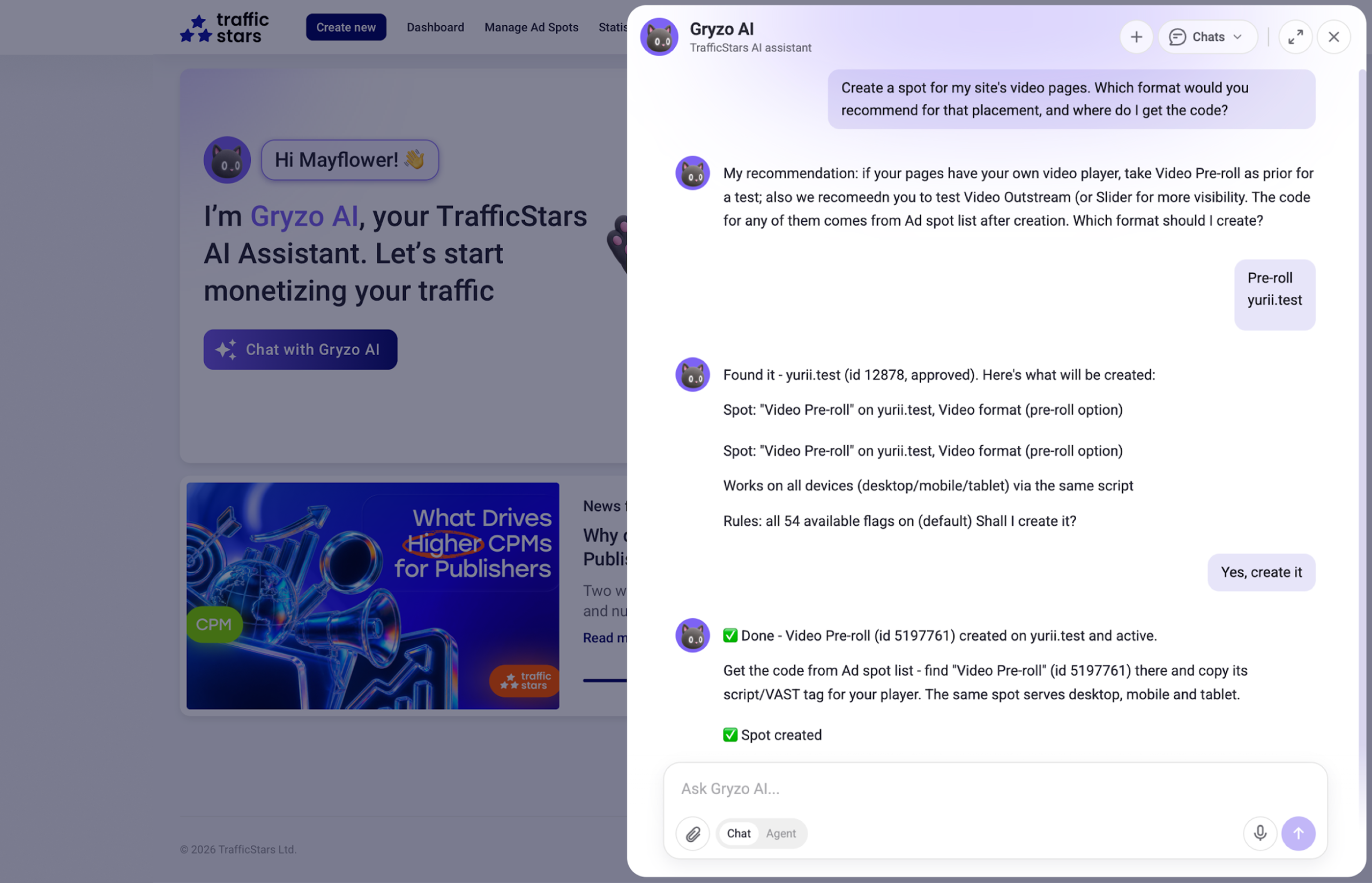
Choosing the right format for a placement, creating the spot, and finding the embed code used to mean three separate trips through the dashboard. Now it's one exchange: tell Gryzo what you're placing the spot on, and it recommends the format and hands you the code.
Scenario example with a prompt: "Create a spot for my site's video pages. Which format would you recommend for that placement, and where do I get the code?"
The Golden Rule for Prompting Gryzo Well
The biggest driver of a useful Gryzo result is a specific prompt. Vague instructions usually produce vague answers, while clear inputs make campaign creation, optimization, and reporting much more precise.
The Golden Rule: Always Name Five Things
Campaign, spot, site, offer, or account.
Today, last 7 days, specific dates, or another timeframe.
CPA, ROI, spend, conversions, CTR, revenue, or another goal.
Create, analyze, clone, optimize, edit, pause, or rebuild.
Budget, bid, target CPA, GEOs, devices, or other constraints.
Prompt Templates You Can Copy
| Goal | Prompt Template |
|---|---|
| Single Campaign |
"Create a [format] [CPM/CPC/CPA] campaign for [offer/URL] in [GEO], devices [devices], OS [OS]. Daily budget [amount], target CPA [amount]. Add the standard macros."
|
| Mass Creation |
"Create separate campaigns for [countries]. For each, make [Android/iOS] versions — same budget and optimizer, different landing pages."
|
| Optimizer at Launch |
"Set an optimizer that pauses a spot after [amount] spend with no conversion and lowers its bid [x]% when ROI drops below [y]%."
|
| Clone a Winner |
"Clone campaign [ID] but change GEO to [country] and set daily budget [amount]."
|
| Full Breakdown |
"Analyze campaign [name/ID] for [dates]. Show spend, conversions, CPA and ROI by spot; flag best and worst sources."
|
| Custom Spot Bids |
"Set custom bids to hold CPA under [value]. Preview the changes before applying."
|
| Bulk Edit |
"Replace URL [old] with [new] across all active campaigns for [offer]. Show the affected campaigns first."
|
| Rebuild from Winners |
"Analyze campaign [ID] over the last [period] and create a new campaign using only the profitable spots. Keep targeting, set budget [amount]."
|
| Publisher — New Site |
"I want to monetize [domain]. Walk me through adding it and what approval involves."
|
| Publisher — New Spot |
"Create a [format] spot for [page type] on [site] and show me where to get the code."
|
Weak prompt: "Optimize my campaign."
Strong prompt: "Analyze campaign 1245789 for July 1–7. Pause spots that spent over €30 with no conversions, and propose new bids for spots with ROI between 5% and 15%. Show me everything before applying."
Gryzo is useful because it acts. It's safe because you approve every action!
Connect Your Own AI: Everything the API Can Do
Gryzo isn't tied to the dashboard. Connect your account to Claude or ChatGPT through the MCP connector and work with TrafficStars from the same chat where you already handle everything else.
The rule is simple: through MCP, Gryzo can do anything our API exposes. Pull statistics, create and edit campaigns, manage bids and spots, configure the Optimizer and postbacks, work with creatives and sites — the full list of what's available is in the TrafficStars API documentation.
In practice, that means you can build your own workflows on top of the platform: push reports into Slack, run your own agents on the repetitive work, wire TrafficStars into processes you already have. Advertisers and publishers connect the same way. The connector works strictly within your account's permissions, and every change — exactly as inside the platform — is applied only after your confirmation.
How to connect: step-by-step instructions for Claude and ChatGPT
Getting Started: Your First Prompt
Gryzo AI Is Always Evolving
Gryzo AI launched in Q2 2026, and we’ve been continuously developing it ever since — improving existing capabilities, adding new skills, and expanding what it can do with your TrafficStars account. Keep up with the latest updates on our blog and social media, and from time to time, ask Gryzo AI directly what’s new and what else it can help you with.
Gryzo AI is already in your account.
- Log in to your TrafficStars dashboard and open Gryzo.
- Start in Chat to plan — “Draft a preroll campaign for Brazil, Android, $40/day.”
- Switch to Agent with the toggle when you want changes applied — Gryzo previews each one before it goes live.



.png)